
THE BRIEFING
60-second read before you dive in:
You’re doing something manually that a machine should be doing.
Copy-pasting data between apps. Sending the same notification every time something happens. Moving files from one place to another. These are not tasks that require a human. They require automation.
Two tools dominate this space: Make.com and Zapier. Both connect your apps and automate your workflows. Both have free tiers. Both work.
But they’re not the same tool. And for a solo founder, picking the wrong one costs you either money, flexibility, or time you don’t have.
Here’s the honest breakdown.
What Is Zapier?
Zapier launched in 2011 and became the default answer to “how do I connect two apps?” for a reason. It’s fast, intuitive, and requires zero technical knowledge. You pick a trigger, pick an action, and you’re done.
It connects over 7,000 apps. The interface is clean. The documentation is excellent. For someone who has never touched automation before, Zapier removes every possible barrier to getting started.
That simplicity comes at a cost. Literally.
What Is Make.com?
Make.com started as Integromat before rebranding in 2022. Where Zapier thinks in straight lines, Make thinks in diagrams. Workflows are built visually on a canvas, with branches, filters, routers, and logic that can handle genuinely complex operations.
It connects over 1,000 apps, fewer than Zapier, but covers everything a solo founder actually needs. The interface takes longer to learn. The payoff is significant.
Head to Head
Price
This is where Make.com pulls away fast.
Zapier’s free tier allows 100 tasks per month. Their Starter plan runs $19.99 per month for 750 tasks. Their Professional plan hits $49 per month for 2,000 tasks. Costs climb quickly as your automations run more frequently.
Make.com’s free tier gives you 1,000 operations per month. Their Core plan is $9 per month for 10,000 operations. The math is not close.
For a solo founder watching every dollar, Make.com wins this category without debate.
Complexity vs Flexibility
Zapier is built for simplicity. If your automation is “when X happens, do Y,” Zapier handles it in minutes. That covers a lot of common use cases and it does them well.
Make.com is built for flexibility. If your automation is “when X happens, check this condition, then do Y or Z depending on the result, then notify me, then log it to a spreadsheet,” Make handles that without breaking a sweat. Zapier starts to struggle.
Winner: depends on what you need. Zapier for simple. Make for complex.
Integrations
Zapier connects to over 7,000 apps. Make connects to over 1,000.
On paper, Zapier wins. In practice, the gap matters less than it looks. Make covers every major tool a solo founder uses: Gmail, Slack, Notion, Airtable, WordPress, Shopify, Google Sheets, and hundreds more. You’re unlikely to hit a wall.
If you rely on a niche or obscure tool, check Make’s app list before committing. For most people, it’s a non-issue.
Winner: Zapier on paper. A draw in practice.
Solo Founder Use Cases
Here’s where the audience matters.
Zapier shines for straightforward, single-step automations. New form submission sends an email. New sale adds a row to a spreadsheet. New subscriber tags a contact in your CRM. These are real, useful workflows and Zapier executes them cleanly.
Make.com shines when you want to build something more sophisticated. Scrape new AI tools from Product Hunt, filter by category, draft a summary, post it to a WordPress draft for review. That’s a multi-step workflow with logic and conditionals. Make handles it. Zapier makes it painful.
For a solo founder building systems, not just shortcuts, Make.com is the right mental model.
Learning Curve
Zapier: you can have your first automation running in under ten minutes. No exaggeration.
Make.com: plan for a few hours to understand how it thinks. The visual canvas is powerful but unfamiliar. Once it clicks, it clicks hard. Before it clicks, it’s frustrating.
If you have zero tolerance for a learning curve, Zapier is your tool. If you’re willing to invest a few hours upfront for significantly more capability and lower cost, Make.com pays off fast.
The Verdict
Choose Zapier if:
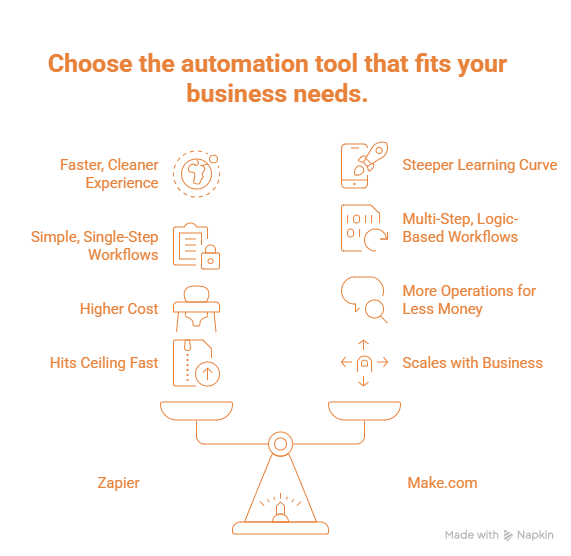
- You’ve never used automation before and want something working today
- Your workflows are simple and single-step
- You’re willing to pay more for a faster, cleaner experience
- You use a niche app that Make doesn’t support
Choose Make.com if:
- You think in systems and want to build real workflows
- Cost matters and you want more operations for less money
- Your automations involve multiple steps, conditions, or logic
- You’re building something that scales with your business
For the SoloScaleTools audience, the pick is Make.com. Solo founders who are serious about running lean and building systems will hit Zapier’s ceiling fast. Make.com grows with you. It’s more powerful, significantly cheaper, and once you learn it, it becomes the backbone of your entire operation.
The learning curve is real. It’s also worth it.
One More Thing
Neither tool replaces strategy. Automation amplifies what you’re already doing. If your workflow is broken, automating it just breaks it faster.
Before you build your first automation, know what problem you’re solving. Then pick your tool. Then build.
That’s how one person runs like a company.
Want more honest tool breakdowns and workflow guides? Subscribe below. No spam. Just signal.